
#6 : 도메인별로 구분하기
질문목록을 만들기에 앞서 패키지를 정리하자.
참고하는 강좌에서는 질문/답변 도메인을 기준으로 정리했으나
이전 프로젝트에서는 엔티티/컨트롤러/리포지토리 등으로 분류하는 게 편했으므로 그걸 따르기로 한다.
#7 : 질문 목록과 템플릿
01. 404 오류 해결하기
- http://localhost:8080/question/list 접속 시 404 에러 발생
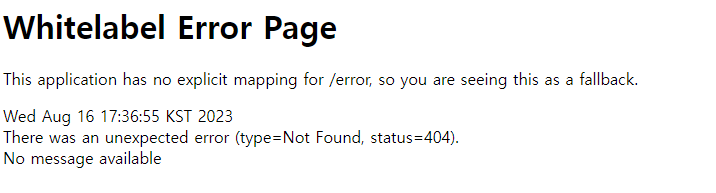
- 해당 URL 매핑이 있는 컨트롤러 생성하기, QuestionController.java 생성
package com.mysite.sbb.controller;

import org.springframework.stereotype.Controller;
import org.springframework.web.bind.annotation.GetMapping;
import org.springframework.web.bind.annotation.RequestMapping;
import org.springframework.web.bind.annotation.ResponseBody;

@Controller
@RequestMapping("/question")
public class QuestionController {

    @GetMapping("/list")
    @ResponseBody
    public String list(){
        return "question list";
    }

}- 오류해결
* 오류 내용 : package com.mysite.sbb.entity.Question does not exist
* 오류 해결 : 저번부터 발생한 오류로, 이미 해당 경로에 파일이 존재함에도 존재하지 않는다는 오류가 떴다. 적절한 생성자가 생성되어 있지 않아 발생한 오류로 final이나 @NonNull인 필드 값만 파라미터로 받는@RequiredArgsConstructor를 엔티티에 추가해주면 해결된다.
02. 템플릿 사용하기
- 타임리프 의존성 주입, build.gradle 수정
 implementation 'org.springframework.boot:spring-boot-starter-thymeleaf'
implementation 'nz.net.ultraq.thymeleaf:thymeleaf-layout-dialect'- src/main/resources/templates에 question_list.html 파일 생성
<!DOCTYPE html>
<html lang="ko">
<head>
    <meta charset="UTF-8">
    <title>Title</title>
</head>
<body>
    <h2>Hello Template</h2>
</body>
</html>- QuestionController.java 수정
package com.mysite.sbb.controller;

import org.springframework.stereotype.Controller;
import org.springframework.web.bind.annotation.GetMapping;
import org.springframework.web.bind.annotation.RequestMapping;
import org.springframework.web.bind.annotation.ResponseBody;

@Controller
@RequestMapping("/question")
public class QuestionController {

    @GetMapping("/list")
    public String list(){
        return "question_list";
    }

}* 템플릿을 사용하기 때문에 @ResponseBody 어노테이션은 삭제한다.
02. 데이터 조회하여 템플릿에 전달
- QuestionController.java 수정
package com.mysite.sbb.controller;

import com.mysite.sbb.entity.Question;
import com.mysite.sbb.repository.QuestionRepository;
import lombok.RequiredArgsConstructor;
import org.springframework.stereotype.Controller;
import org.springframework.ui.Model;
import org.springframework.web.bind.annotation.GetMapping;
import org.springframework.web.bind.annotation.RequestMapping;

import java.util.List;

@Controller
@RequiredArgsConstructor
@RequestMapping("/question")
public class QuestionController {

    private final QuestionRepository questionRepository;

    @GetMapping("/list")
    public String list(Model model){
        List<Question> qList = this.questionRepository.findAll();
        model.addAttribute("qList",qList);
        return "question_list";
    }

}* @RequiredArgsConstructor : final이 붙은 속성을 포함하는 생성자를 자동 생성해주는 어노테이션
(의존성 주입을 위해서는 @Autowierd, 생성자, Setter를 통한 주입을 사용한다.)
03. 전달받은 데이터 출력
- question_list.html 수정
<!DOCTYPE html>
<html lang="ko">
<head>
    <meta charset="UTF-8">
    <title>Title</title>
</head>
<body>
    <table>
        <thead>
            <tr>
                <th>제목</th>
                <th>작성일시</th>
            </tr>
        </thead>
        <tbody>
            <tr th:each="question : ${qList}">
                <td th:text="${question.subject}"></td>
                <td th:text="${question.createDate}"></td>
            </tr>
        </tbody>
    </table>
</body>
</html>* th:~는 타임리프 코드라는 것을 명시해주는 속성이다.
* th:each : <tr> 엘리먼트를 qList의 갯수만큼 반복 출력, 저장된 데이터를 하나씩 꺼내어 사용할 수 있게 해준다.
* th:text : 해당 변수를 엘리먼트의 값으로 출력, [[${}]]의 형태로 직접 출력도 가능하다.
#8 : ROOT URL
- 루트 URL은 아무런 요청명도 붙이지 않은 기본 URL을 말한다.
- 루트 URL 호출 시 나타날 화면을 위해 MainController.java 수정
package com.mysite.sbb;

import org.springframework.stereotype.Controller;
import org.springframework.web.bind.annotation.GetMapping;
import org.springframework.web.bind.annotation.ResponseBody;

@Controller
public class MainController {

    @GetMapping("/sbb")
    @ResponseBody
    public String index(){
        //System.out.println("index");
        return "sbb 요청 리턴";
    }

    @GetMapping("/")
    public String root(){
        return "redirect:/question/list";
    }
}* redurect:/ : 완전히 새로운 요청으로 재연결
* forward:/ : 기존 요청값이 유지된 채 URL 전환
#8 : 서비스
- 대부분의 규모있는 스프링부트 프로젝트는 컨트롤러에서 리포지토리를 직접 호출하지 않고 중간에 서비스를 두어 데이터를 처리한다.
01. 서비스가 필요한 이유
- 모듈화
* 서비스를 만들어두면, 기능을 서비스에 구현하여 필요할 때마다 해당 기능을 불러와 사용하면 된다.
* 서비스가 없을 경우 해당 기능을 컨트롤러에서 중복으로 구현해야 할 가능성이 있다.
- 보안
* 컨트롤러는 리포지토리 없이 서비스를 통해서만 데이터베이스에 접근하도록 하는 것이 보안에 유리
* 해킹을 통해 컨트롤러를 제어하더라도 리포지토리에 직접 접근은 불가능
- 엔티티 객체과 DTO 객체의 변환
* Question, Answer 클래스와 같은 엔티티 클래스는 데이터베이스와 직접 맞닿아 있어 컨트롤러나 타임리프 등의 템플릿 엔진에 전달하여 사용하는 것은 좋지 않다. 엔티티를 직접 사용하여 속성 변경 시 테이블 컬럼이 엉망이 될 수도 있기 때문이다.
* 이 때문에 이를 대신할 DTO 클래스가 필요하고 엔티티 객체를 DTO 객체로 변환하는 작업이 필요하다. 이 작업 또한 서비스에서 처리하여 양방향에 전달하면 된다.
02. QuestionService
- QuestionService.java 생성
package com.mysite.sbb.service;

import com.mysite.sbb.entity.Question;
import com.mysite.sbb.repository.QuestionRepository;
import lombok.RequiredArgsConstructor;
import org.springframework.stereotype.Service;

import java.util.List;

@Service
@RequiredArgsConstructor
public class QuestionService {
    private final QuestionRepository questionRepository;

    public List<Question> getLisy(){
        return this.questionRepository.findAll();
    }
}@Service : 서비스 파일이라는 것을 명시
03. QuestionController
- QuestionController.java 수정
package com.mysite.sbb.controller;

import com.mysite.sbb.entity.Question;
import com.mysite.sbb.repository.QuestionRepository;
import com.mysite.sbb.service.QuestionService;
import lombok.RequiredArgsConstructor;
import org.springframework.stereotype.Controller;
import org.springframework.ui.Model;
import org.springframework.web.bind.annotation.GetMapping;
import org.springframework.web.bind.annotation.RequestMapping;

import java.util.List;

@Controller
@RequiredArgsConstructor
@RequestMapping("/question")
public class QuestionController {

    private final QuestionService questionService;

    @GetMapping("/list")
    public String list(Model model){
        List<Question> qList = this.questionService.getList();
        model.addAttribute("qList",qList);
        return "question_list";
    }

}* 리포지토리 부분이 서비스로 교체되었다.
'T-I-L > [책] 요약&정리' 카테고리의 다른 글
| [점프 투 스프링부트] 2장 스프링부트의 기본 요소(답변등록,부트스트랩) - 2023. 08. 18 (0) | 2023.08.18 |
|---|---|
| [점프 투 스프링부트] 2장 스프링부트의 기본 요소(질문상세) - 2023. 08. 17 (0) | 2023.08.17 |
| [점프 투 스프링부트] 2장 스프링부트의 기본 요소(엔티티,리포지토리) - 2023. 08. 14 (0) | 2023.08.14 |
| [점프 투 스프링부트] 2장 스프링부트의 기본 요소(프로젝트구성, 컨트롤러, JPA) - 2023. 08. 11 (0) | 2023.08.12 |
| [점프 투 스프링부트] 1장 스프링부트 개발 준비 - 2023. 08. 10 (0) | 2023.08.10 |
