
#5 : 스프링 시큐리티
01. 스프링 시큐리티란?
- 스프링 기반 애플리케이션의 인증과 권한을 담당하는 하위 프레임 워크
- 인증(Authenticate)은 로그인을 의미한다.
- 권한(Authorize)은 인증된 사용자가 어떤 것을 할 수 있는지를 의미한다.
02. 스프링 시큐리티 설치
- build.gradle 파일 수정
	implementation 'org.springframework.boot:spring-boot-starter-security'
implementation 'org.thymeleaf.extras:thymeleaf-extras-springsecurity6:3.1.1.RELEASE'- thymeleaf-extras-springsecurity6 패키지는 3.0.0 버전에서 버전 정보를 입력하지 않으면 오류가 난다.
03. 스프링 시큐리티 설정
- 설치한 후 질문 목록 접속하기

* 인증되지 않은 사용자는 서비스 사용 불가능
- 스프링 시큐리티 환경설정 파일 SecurityConfig.java 생성
package com.mysite.sbb

import org.springframework.context.annotation.Bean
import org.springframework.context.annotation.Configuration
import org.springframework.security.config.annotation.web.builders.HttpSecurity
import org.springframework.security.config.annotation.web.configuration.EnableWebSecurity
import org.springframework.security.web.SecurityFilterChain
import org.springframework.util.AntPathMatcher

@Configuration
@EnableWebSecurity
class SecurityConfig {
    @Bean
    SecurityFilterChain filterChain(HttpSecurity http) throws Exception{
        http
                .authorizeHttpRequests((authrizeHttpRequests -> authorizeHttpRequests
                        .requestMatchers(new AntPathMatcher("/**")).permitAll()));

        return http.build();
    }
}* @Configuration : 스프링의 환경설정 파일임을 의미
* @EnableWebSecurity : 모든 요청 URL이 스프링 시큐리티의 제어를 받도록 만듦, 내부적으로 SpringSecurityFilterChain이 동작하며 URL 필터가 적용
* 세부 설정은 SecurityFilterChain 빈을 생성하여 설정, @Bean 아래의 내용은 모든 인증되지 않은 요청을 허락한다는 의미이다.
04. H2 콘솔
- H2 콘솔 로그인 시 다음과 같은 403 오류가 발생 -> CSRF 기능이 동작하기 때문
* CSRF(cross site request forgery) : 스프링 시큐리티가 CSRF 토큰 값을 세션을 통해 발행하고 웹 페이지에서는 폼 전송 시에 해당 토큰을 함께 전송하여 웹페이지에서 작성된 데이터가 전달되는지 검증하는 기술
- 폼 태그 밑에 input 엘리먼트 자동 생성, CSRF 토큰 확인 가능
- 스프링 시큐리티에 h2 콘솔의 CSRF 예외 처리, SecurityConfig.java 수정
@Configuration
@EnableWebSecurity
public class SecurityConfig {
    @Bean
    SecurityFilterChain filterChain(HttpSecurity http) throws Exception {
        http
            .authorizeHttpRequests((authorizeHttpRequests) -> authorizeHttpRequests
                .requestMatchers(new AntPathRequestMatcher("/**")).permitAll())
            .csrf((csrf) -> csrf
                .ignoringRequestMatchers(new AntPathRequestMatcher("/h2-console/**")))
        ;
        return http.build();
    }
}* /h2-console/ 로 시작하는 URL은 검증을 하지 않는다는 설정을 추가
* 다시 접속 시 로그인은 수행되나 화면이 깨져보인다. -> 스프링 시큐리티는 사이트의 콘텐츠가 다른 사이트에 포함되지 않도록 X-Frame-Options 헤더값을 사용하여 방지하는데, H2 콘솔화면이 frame 구조로 작성됨
- SecurityConfig.java 수정
@Configuration
@EnableWebSecurity
public class SecurityConfig {
    @Bean
    SecurityFilterChain filterChain(HttpSecurity http) throws Exception {
        http
            .authorizeHttpRequests((authorizeHttpRequests) -> authorizeHttpRequests
                .requestMatchers(new AntPathRequestMatcher("/**")).permitAll())
            .csrf((csrf) -> csrf
                .ignoringRequestMatchers(new AntPathRequestMatcher("/h2-console/**")))
            .headers((headers) -> headers
                .addHeaderWriter(new XFrameOptionsHeaderWriter(
                    XFrameOptionsHeaderWriter.XFrameOptionsMode.SAMEORIGIN)))
        ;
        return http.build();
    }
}* X-Frame-Options 요청 값을 sameorigon으로 설정, frame에 포함된 페이지가 페이지를 제공하는 사이트와 동일할 시 계속 사용 가능
⚡ 생각상자
permitAll() 적용이 되지 않는다... 버전 문제이거나 잘못된 부분이 있는 것 같은데 우선 예제를 그대로 복사해 넣어도 같은 오류가 나니 뭔가 문제가 있는 게 분명하다.
아래처럼 arhorizeHttpRequests에 취소선이 그어진다.
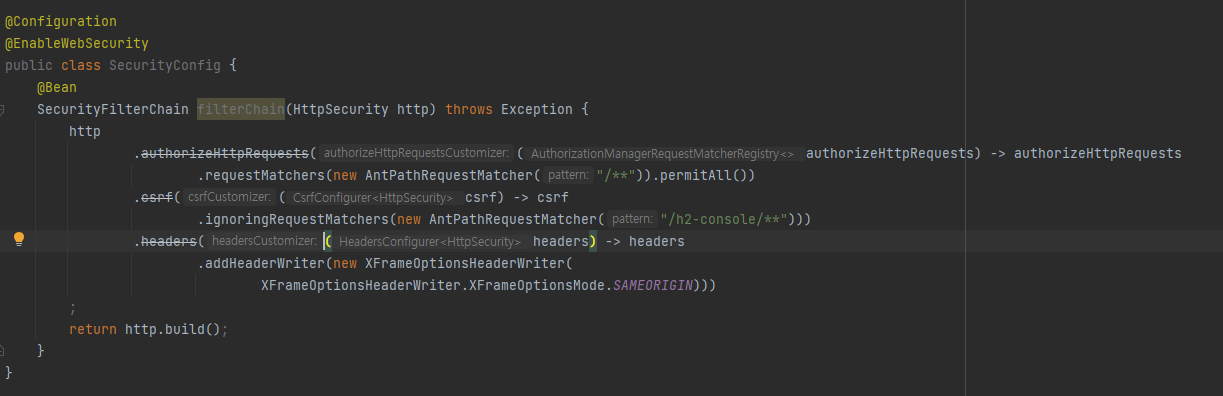
오류 해결 시도
- 그냥 AnyRequest에 permitAll을 주면 된다고 해서 시도했지만 실패
- 사이트 내의 csrf 전체를 무시해도 실패(permitAll부터 해결이 안되고 있으니 이건 우선 그 다음 문제일지도)
좀 더 방법을 찾아보아야할 것 같다.💦💦
+ 23. 08. 29
- 저렇게 중간줄이 그어지는 건 해당 기능이 deprecated 되었기 때문이라는 걸 알게 되었다.
- API 문서도 찾아보았지만, 여전히 어떻게 변경해야할지 감이 잡히지 않는다. 일단 더 찾아보는 걸로!
'T-I-L > [책] 요약&정리' 카테고리의 다른 글
| [점프 투 스프링부트] 3장 SBB 서비스 개발(로그인&로그아웃) - 2023. 08. 29. ~ 2023. 08. 30. (0) | 2023.08.29 |
|---|---|
| [점프 투 스프링부트] 3장 SBB 서비스 개발(회원가입) - 2023. 08. 28. (0) | 2023.08.28 |
| [점프 투 스프링부트] 3장 SBB 서비스 개발(일련번호, 답변개수) - 2023. 08. 23. (0) | 2023.08.23 |
| [점프 투 스프링부트] 3장 SBB 서비스 개발(내비게이션바, 페이징) - 2023. 08. 22. (0) | 2023.08.22 |
| [점프 투 스프링부트] 2장 스프링부트의 기본 요소(템플릿상속, 질문등록과폼, 공통템플릿) - 2023. 08. 21. (0) | 2023.08.21 |
