
#7 : 로그인과 로그아웃
01. 로그인 구현하기
- 스프링 시큐리티에 로그인 URL을 등록하기 위해 SecurityConfig.java 수정
package com.mysite.sbb;

import org.springframework.context.annotation.Bean;
import org.springframework.context.annotation.Configuration;
import org.springframework.security.config.annotation.web.builders.HttpSecurity;
import org.springframework.security.config.annotation.web.configuration.EnableWebSecurity
import org.springframework.security.config.annotation.web.configuration.WebSecurityConfiguration
import org.springframework.security.crypto.bcrypt.BCryptPasswordEncoder
import org.springframework.security.crypto.password.PasswordEncoder;
import org.springframework.security.web.SecurityFilterChain
import org.springframework.security.web.header.writers.frameoptions.XFrameOptionsHeaderWriter;
import org.springframework.security.web.util.matcher.AntPathRequestMatcher;

@Configuration
@EnableWebSecurity
public class SecurityConfig {
    @Bean
    SecurityFilterChain filterChain(HttpSecurity http) throws Exception {
        http
                .authorizeHttpRequests((authorizeHttpRequests) -> authorizeHttpRequests
                        .requestMatchers(new AntPathRequestMatcher("/**")).permitAll())
                .csrf((csrf) -> csrf
                        .ignoringRequestMatchers(new AntPathRequestMatcher("/h2-console/**")))
                .headers((headers) -> headers
                        .addHeaderWriter(new XFrameOptionsHeaderWriter(
                                XFrameOptionsHeaderWriter.XFrameOptionsMode.SAMEORIGIN)))
                .formLogin((formLogin) -> formLogin
                    .loginPage("/user/login")
                    .defaultSuccessUrl("/"))
        ;
        return http.build();
    }

    @Bean
    PasswordEncoder passwordEncoder(){
        return new BCryptPasswordEncoder();
    }
}* .formLogin : 로그인 설정을 담당하는 메서드, 로그인 페이지와 로그인 성공 시 이동하는 디폴트 페이지 지정
- 로그인 요청 처리 UserController.java에 추가
...생략...
    @GetMapping("/login")
    public String login(){
        return "login_form";
}* POST 방식은 시큐리티가 처리하므로 직접 구현할 필요가 없다.
- login_form.html 생성
<!DOCTYPE html>
<html xmlns:th="http://www.thymeleaf.org"
      xmlns:layout="http://www.ultraq.net.nz/thymeleaf/layout"
      layout:decorate="~{layout}">
<div layout:fragment="content" class="container my-3">
    <form th:action="@{/user/login}" method="post">
        <div th:if="${param.error}">
            <div class="alert alert-danger">
                사용자ID 또는 비밀번호를 확인해 주세요.
            </div>
        </div>
        <div class="mb-3">
            <label for="username" class="form-label">사용자ID</label>
            <input type="text" name="username" id="username" class="form-control">
        </div>
        <div class="mb-3">
            <label for="password" class="form-label">비밀번호</label>
            <input type="password" name="password" id="password" class="form-control">
        </div>
        <button type="submit" class="btn btn-primary">로그인</button>
    </form>
</div>
</html>* 로그인 실패 시 다시 로그인 페이지로 이동, 이 때 파라미터로 error가 함께 전달(스프링 시큐리티 규칙) -> 오류메세지 출력
* 로그인 화면 출력을 되지만 아직 로그인은 불가능, 이제 데이터베이스에서 사용자를 조회하는 서비스를 생성 후 스프링 시큐리티에 등록하는 과정이 필요하다. 리포지토리와 UserRole 등의 클래스도 필요하다.
- UserRepository.java 수정
package com.mysite.sbb.repository;

import com.mysite.sbb.entity.SiteUser;
import org.springframework.data.jpa.repository.JpaRepository;

import java.util.Optional;

public interface UserRepository extends JpaRepository<SiteUser, Long> {
    Optional<SiteUser> findByusername(String username);
}* 사용자를 조회하는 findByusername 추가
- UserRole.java 생성
package com.mysite.sbb;

import lombok.Getter;


@Getter
public enum UserRole {
    ADMIN("ROLE_ADMIN"),
    USER("ROLE_USER");

    UserRole(String value) {
        this.value = value;
    }

    private String value;
}* 인증 후 사용자에게 권한을 부여할 역할을 신규로 작성
* UserRole은 열거 자료형인 enum으로 작성
* ADMIN은 ROLE_ADMIN, USER는 ROLE_USER라는 값을 갖는다. 상수이기 때문에 Getter만 사용가능하다.
- 시큐리티 설정에 등록할 UserSecurityService.java 생성
package com.mysite.sbb;

import java.util.ArrayList;
import java.util.List;
import java.util.Optional;

import com.mysite.sbb.entity.SiteUser;
import com.mysite.sbb.repository.UserRepository;
import org.springframework.security.core.GrantedAuthority;
import org.springframework.security.core.authority.SimpleGrantedAuthority;
import org.springframework.security.core.userdetails.User;
import org.springframework.security.core.userdetails.UserDetails;
import org.springframework.security.core.userdetails.UserDetailsService;
import org.springframework.security.core.userdetails.UsernameNotFoundException;
import org.springframework.stereotype.Service;

import lombok.RequiredArgsConstructor;

@RequiredArgsConstructor
@Service
public class UserSecurityService implements UserDetailsService {

    private final UserRepository userRepository;

    @Override
    public UserDetails loadUserByUsername(String username) throws UsernameNotFoundException {
        Optional<SiteUser> _siteUser = this.userRepository.findByusername(username);
        if (_siteUser.isEmpty()) {
            throw new UsernameNotFoundException("사용자를 찾을수 없습니다.");
        }
        SiteUser siteUser = _siteUser.get();
        List<GrantedAuthority> authorities = new ArrayList<>();
        if ("admin".equals(username)) {
            authorities.add(new SimpleGrantedAuthority(UserRole.ADMIN.getValue()));
        } else {
            authorities.add(new SimpleGrantedAuthority(UserRole.USER.getValue()));
        }
        return new User(siteUser.getUsername(), siteUser.getPassword(), authorities);
    }
}* 이 서비스 클래스는 스프링 시큐리티가 제공하는 UserDatailService 인터페이스를 구현해야한다.
* UserDetailService : loadUserByUsername 메세드를 구현하도록 강제하는 인터페이스, 사용자명으로 비밀번호를 조회하여 반환
* loadUserByUsername는 사용자명으로 SiteUser 객체를 조회하고 만약 데이터가 없을 시에는 UsernameNotFoundException을 발생시킨다.
* 사용자명, 비밀번호, 권한을 입력으로 스프링 시큐리티의 User객체 생성 후 반환, 반환된 객체의 비밀번호가 입력받은 비밀번호와 일치하는 지 검사하는 내부 로직을 수행한다.
- SecurityConfig.java 수정
package com.mysite.sbb

import jakarta.servlet.DispatcherType;
import org.springframework.context.annotation.Bean;
import org.springframework.context.annotation.Configuration
import org.springframework.security.authentication.AuthenticationManager
import org.springframework.security.config.annotation.authentication.configuration.AuthenticationConfiguration;
import org.springframework.security.config.annotation.web.builders.HttpSecurity;
import org.springframework.security.config.annotation.web.configuration.EnableWebSecurity
import org.springframework.security.config.annotation.web.configuration.WebSecurityConfiguration
import org.springframework.security.crypto.bcrypt.BCryptPasswordEncoder
import org.springframework.security.crypto.password.PasswordEncoder;
import org.springframework.security.web.SecurityFilterChain
import org.springframework.security.web.header.writers.frameoptions.XFrameOptionsHeaderWriter;
import org.springframework.security.web.util.matcher.AntPathRequestMatcher
import org.springframework.web.servlet.config.annotation.EnableWebMvc;

@Configuration
@EnableWebSecurity
public class SecurityConfig {
    @Bean
    SecurityFilterChain filterChain(HttpSecurity http) throws Exception {
        http
                .authorizeHttpRequests((authorizeHttpRequests) -> authorizeHttpRequests
                        .requestMatchers(new AntPathRequestMatcher("/**")).permitAll()
                        .anyRequest().authenticated())
                .csrf((csrf) -> csrf
                        .ignoringRequestMatchers(new AntPathRequestMatcher("/h2-console/**")))
                .headers((headers) -> headers
                        .addHeaderWriter(new XFrameOptionsHeaderWriter(
                                XFrameOptionsHeaderWriter.XFrameOptionsMode.SAMEORIGIN)))
                .formLogin((formLogin) -> formLogin
                    .loginPage("/user/login")
                    .defaultSuccessUrl("/"))
        ;
        return http.build();
    }

    @Bean
    PasswordEncoder passwordEncoder(){
        return new BCryptPasswordEncoder();
    }

    @Bean
    AuthenticationManager authenticationManager(AuthenticationConfiguration authenticationConfiguration) throws Exception {
        return authenticationConfiguration.getAuthenticationManager();
    }
}* 스프링 시큐리티의 인증을 담당하는 AuthenticationManager 빈을 생성, 사용자 인증 시 앞에서 작성한 UserSecurityService와 PasswordEncoder를 사용한다.
- 로그인 페이지 링크를 navbar.html에 추가
<nav th:fragment="navbarFragment" class="navbar navbar-expand-lg navbar-light bg-light border-bottom">
  <div class="container-fluid">
    <a class="navbar-brand" href="/">SBB</a>
    <button class="navbar-toggler" type="button"
            data-bs-toggle="collapse" data-bs-target="#navbarSupportedContent"
            aria-controls="navbarSupportedContent" aria-expanded="false" aria-label="Toggle navigation">
      <span class="navbar-toggler-icon"></span>
    </button>
    <div class="collapse navbar-collapse" id="navbarSupportedContent">
      <ul class="navbar-nav me-auto mb-2 mb-lg-0">
        <li class="nav-item">
          <a class="nav-link" th:href="@{/user/login}">로그인</a>
        </li>
        <li>
          <a class="nav-link" th:href="@{/user/signup}">회원가입</a>
        </li>
      </ul>
    </div>
  </div>
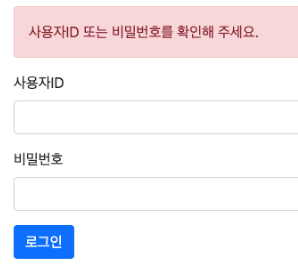
</nav>* 잘못된 정보 입력 시 아래와 같은 메세지 출력
- 로그인/로그아웃 링크 navbar.html 수정
* 로그인을 한 상태라면 로그인 메뉴 대신 로그아웃 메뉴가 표시되도록 해야한다.
* 이 경우 sec:authorize="" 속성을 활용할 수 있다. 해당 속성의 값이 isAnonymous()이면 로그인되지 않았을 때만 해당 엘리먼트가 표시되고, isAuthenticated()이면 로그인이 된 경우에만 해당 속성이 표시된다.
<nav th:fragment="navbarFragment" class="navbar navbar-expand-lg navbar-light bg-light border-bottom">
  <div class="container-fluid">
    <a class="navbar-brand" href="/">SBB</a>
    <button class="navbar-toggler" type="button"
            data-bs-toggle="collapse" data-bs-target="#navbarSupportedContent"
            aria-controls="navbarSupportedContent" aria-expanded="false" aria-label="Toggle navigation">
      <span class="navbar-toggler-icon"></span>
    </button>
    <div class="collapse navbar-collapse" id="navbarSupportedContent">
      <ul class="navbar-nav me-auto mb-2 mb-lg-0">
        <li class="nav-item">
          <a class="nav-link" sec:authorize="isAnonymous()" th:href="@{/user/login}">로그인</a>
          <a class="nav-link" sec:authorize="isAuthenticated()" th:href="@{/user/logout}">로그아웃</a>
        </li>
        <li>
          <a class="nav-link" th:href="@{/user/signup}">회원가입</a>
        </li>
      </ul>
    </div>
  </div>
</nav>
02. 로그아웃 구현하기
- SecurityConfig.java 수정하여 로그아웃 요청 처리
package com.mysite.sbb

import jakarta.servlet.DispatcherType;
import org.springframework.context.annotation.Bean;
import org.springframework.context.annotation.Configuration
import org.springframework.security.authentication.AuthenticationManager
import org.springframework.security.config.annotation.authentication.configuration.AuthenticationConfiguration;
import org.springframework.security.config.annotation.web.builders.HttpSecurity;
import org.springframework.security.config.annotation.web.configuration.EnableWebSecurity
import org.springframework.security.config.annotation.web.configuration.WebSecurityConfiguration
import org.springframework.security.crypto.bcrypt.BCryptPasswordEncoder
import org.springframework.security.crypto.password.PasswordEncoder;
import org.springframework.security.web.SecurityFilterChain
import org.springframework.security.web.header.writers.frameoptions.XFrameOptionsHeaderWriter
import org.springframework.security.web.util.matcher.AndRequestMatcher;
import org.springframework.security.web.util.matcher.AntPathRequestMatcher
import org.springframework.web.servlet.config.annotation.EnableWebMvc;

@Configuration
@EnableWebSecurity
public class SecurityConfig {
    @Bean
    SecurityFilterChain filterChain(HttpSecurity http) throws Exception {
        http
                .authorizeHttpRequests((authorizeHttpRequests) -> authorizeHttpRequests
                        .requestMatchers(new AntPathRequestMatcher("/**")).permitAll()
                        .anyRequest().authenticated())
                .csrf((csrf) -> csrf
                        .ignoringRequestMatchers(new AntPathRequestMatcher("/h2-console/**")))
                .headers((headers) -> headers
                        .addHeaderWriter(new XFrameOptionsHeaderWriter(
                                XFrameOptionsHeaderWriter.XFrameOptionsMode.SAMEORIGIN)))
                .formLogin((formLogin) -> formLogin
                    .loginPage("/user/login")
                    .defaultSuccessUrl("/"))
                .logout((logout)->logout
                    .logoutRequestMatcher(new AndRequestMatcher("/user/logout"))
                    .logoutSuccessUrl("/")
                    .invalidateHttpSession(true))
        ;
        return http.build();
    }

    @Bean
    PasswordEncoder passwordEncoder(){
        return new BCryptPasswordEncoder();
    }

    @Bean
    AuthenticationManager authenticationManager(AuthenticationConfiguration authenticationConfiguration) throws Exception {
        return authenticationConfiguration.getAuthenticationManager();
    }
}* 로그아웃 요청 URL을 "/user/logout"으로 설정 후 수행 시 이동할 페이지를 루트 페이지도 지정했다. 또한 로그아웃 후 생성된 사용자 세션도 삭제하도록 처리했다.
'T-I-L > [책] 요약&정리' 카테고리의 다른 글
| [점프 투 스프링부트] 3장 SBB 서비스 개발(글쓴이 표시) - 2023. 09. 04. (0) | 2023.09.04 |
|---|---|
| [점프 투 스프링부트] 3장 SBB 서비스 개발(엔티티 변경) - 2023. 09. 01. (0) | 2023.09.01 |
| [점프 투 스프링부트] 3장 SBB 서비스 개발(회원가입) - 2023. 08. 28. (0) | 2023.08.28 |
| [점프 투 스프링부트] 3장 SBB 서비스 개발(스프링 시큐리티) - 2023. 08. 24. (0) | 2023.08.25 |
| [점프 투 스프링부트] 3장 SBB 서비스 개발(일련번호, 답변개수) - 2023. 08. 23. (0) | 2023.08.23 |
